Why Great Website Design Transforms Small Businesses
Website design for small business is no longer optional—it’s absolutely essential. A well-designed website serves as your digital storefront, a 24/7 customer service representative, and the central hub for all your marketing efforts. Investing in professional website design for small business can significantly impact growth by shaping how customers perceive your brand, building trust, and ultimately increasing revenue. A strategically designed website empowers small businesses to stand out and compete with larger players in their industry.
First Impressions Matter Online
Think of your website as the first handshake with a potential customer. A cluttered or outdated site may drive visitors away, while a modern, user-friendly design builds credibility and inspires trust. Effective website design for small business makes all the difference—especially since 81% of shoppers research online before purchasing. In fact, a 2023 study revealed that 73% of U.S. small businesses now have a website, showing a growing awareness of just how crucial a strong online presence has become.
Design That Drives Conversions
Great website design goes beyond just looking good; it strategically guides visitor behavior toward specific actions, such as making a purchase or contacting your business. Clear calls to action, intuitive navigation, and strategically placed contact forms all encourage engagement and conversion. A mobile-friendly website is also crucial, ensuring a seamless user experience for customers on the go. These elements create a positive user experience, building trust and ultimately driving business growth.
Competing With the Big Players
Many small businesses think they can’t compete with the complex websites of large corporations. However, a professionally designed website, even on a limited budget, allows small businesses to project an image of professionalism and credibility. This is achieved through thoughtful branding, high-quality visuals, and engaging content, contributing to a strong online presence that rivals even the biggest competitors. A well-executed website can be a small business’s secret weapon, helping them outperform expectations and gain a larger market share.
Beyond the Website: Building a Brand
Your website is more than just an online address; it’s the cornerstone of your brand identity. It’s a platform to communicate your unique value proposition, showcase your products or services, and connect with your target audience. A consistently branded website, reflecting your company’s personality and values, helps build brand recognition and fosters customer loyalty, turning casual visitors into repeat customers. A strong brand presence, nurtured by a well-designed website, sets the stage for long-term business success.
Essential Elements That Turn Visitors Into Customers

Building a website for your small business involves more than just attractive visuals; it requires a strategic approach to convert casual visitors into paying customers. This means understanding how specific design elements influence user behavior and encourage conversions. Let’s explore these key components that can transform your online presence into a revenue-generating engine.
Responsive Design: Reaching Customers on Any Device
Today’s consumers access websites from a multitude of devices, from desktops and laptops to tablets and smartphones. Having a responsive design is crucial for providing a seamless and consistent user experience across all platforms.
This adaptability ensures your website adjusts to different screen sizes, maintaining its functionality and visual appeal no matter the device. This approach eliminates the need for separate mobile versions, simplifying website management and ensuring a positive user experience.
Intuitive Navigation: Guiding Users to Their Destination
Imagine a physical store with disorganized aisles and unclear signage—a frustrating experience. This same principle applies to website navigation. Intuitive navigation is paramount for guiding users effortlessly through your site.
A clear and logical menu structure, combined with effective internal linking, ensures visitors can quickly find what they’re searching for. This streamlined experience reduces user frustration and encourages exploration, increasing conversion opportunities.
Strategic Content Placement: Highlighting Your Value Proposition
Much like a well-designed retail store strategically positions its most attractive products, your website should highlight your value proposition clearly and prominently. This involves placing key information, like compelling product descriptions and special offers, in strategic locations.
Consider the user’s journey and the information they need at each stage. By presenting relevant content at the right moment, you guide users towards desired actions and boost conversions. For example, a concise call to action placed near a product description can significantly influence purchasing decisions.
User experience and design are critical for converting visitors into customers. 94% of online users find easy navigation to be the most important website feature, and 83% appreciate an attractive, up-to-date website. This underscores the importance of investing in good web design.
Furthermore, 43% of small businesses plan to improve their website performance and page speed, indicating an awareness of the need for optimization. Coupled with the fact that 42% of people would leave a website due to poor functionality, these statistics highlight the risks of neglecting these elements.
Page Load Speed: Keeping Visitors Engaged
In today’s fast-paced online world, slow-loading websites lead to high bounce rates. Optimizing your website’s page load speed is essential for keeping visitors engaged and improving conversions.
This optimization involves minimizing image sizes, streamlining code, and selecting a reliable hosting provider. A fast-loading site enhances user experience, reduces frustration, and ultimately boosts conversion rates. For further website optimization tips, consider: How to master your website with our sitemap.
Accessibility Features: Expanding Your Reach
Ensuring website accessibility for all users, including those with disabilities, is ethically responsible and expands your potential customer base. Accessibility features like alternative text for images, keyboard navigation, and closed captions for videos make your site usable for everyone.
By considering the needs of all potential customers, you demonstrate inclusivity and broaden your reach, fostering a more positive brand image. This inclusive approach enhances usability and aligns your business with values of inclusivity and social responsibility.
DIY vs. Professional Design: Making the Smart Choice
Choosing between a do-it-yourself (DIY) website builder and hiring a professional web design service is a crucial decision for any small business. This choice significantly impacts your online presence, your brand image, and, ultimately, your bottom line. Understanding the true costs, benefits, and potential drawbacks of each option is essential for making an informed decision.
Weighing the Pros and Cons of DIY Website Builders
DIY platforms like Wix or Squarespace offer an enticing proposition: affordability and apparent simplicity. These platforms provide user-friendly interfaces with drag-and-drop functionality, pre-designed templates, and integrated hosting, making them accessible even without coding experience. This can be a cost-effective starting point for businesses with extremely limited budgets.
However, this ease of use often comes with limitations. Customization options can be restrictive, leading to a generic look that doesn’t differentiate your brand. Furthermore, DIY platforms may lack advanced features crucial for business growth, such as search engine optimization (SEO) tools, robust e-commerce functionality, or complex integrations. This can hinder your ability to attract organic traffic, manage online sales effectively, or scale your website as your business grows.
The Value of Professional Website Design for Small Businesses
While professional website design requires a larger upfront investment, it offers significant long-term advantages. Experienced designers create custom websites tailored to your unique business needs, incorporating branding elements, optimizing for user experience (UX), and ensuring mobile responsiveness.
They also integrate essential features like SEO best practices, e-commerce functionalities, and security measures. This results in a website that not only looks professional but also performs effectively, attracting customers, driving conversions, and supporting business growth. Additionally, professional designers often handle technical aspects like maintenance and updates, freeing up your time to focus on core business operations.
The Hybrid Approach: Blending DIY and Professional Expertise
For resource-conscious businesses, a hybrid approach can offer the best of both worlds. This involves using a DIY platform for the initial website setup and then engaging a professional designer for specific tasks like custom branding, advanced functionality implementation, or SEO optimization.
This strategy allows businesses to maintain control over some aspects of their website while leveraging professional expertise for critical areas that require specialized skills. This can be a smart way to balance budget constraints with the need for a professional online presence.
Making the Right Choice: A Decision-Making Guide
To navigate this critical choice, we’ve created a decision tree infographic to help you determine the best approach for your small business website design. This tool helps you analyze your specific needs, budget, and technical capabilities. Learn more in our article about how to master your sitemaps.
The decision tree below visualizes the decision-making process for choosing between DIY, professional, or hybrid website design based on budget, technical skills, and long-term goals.
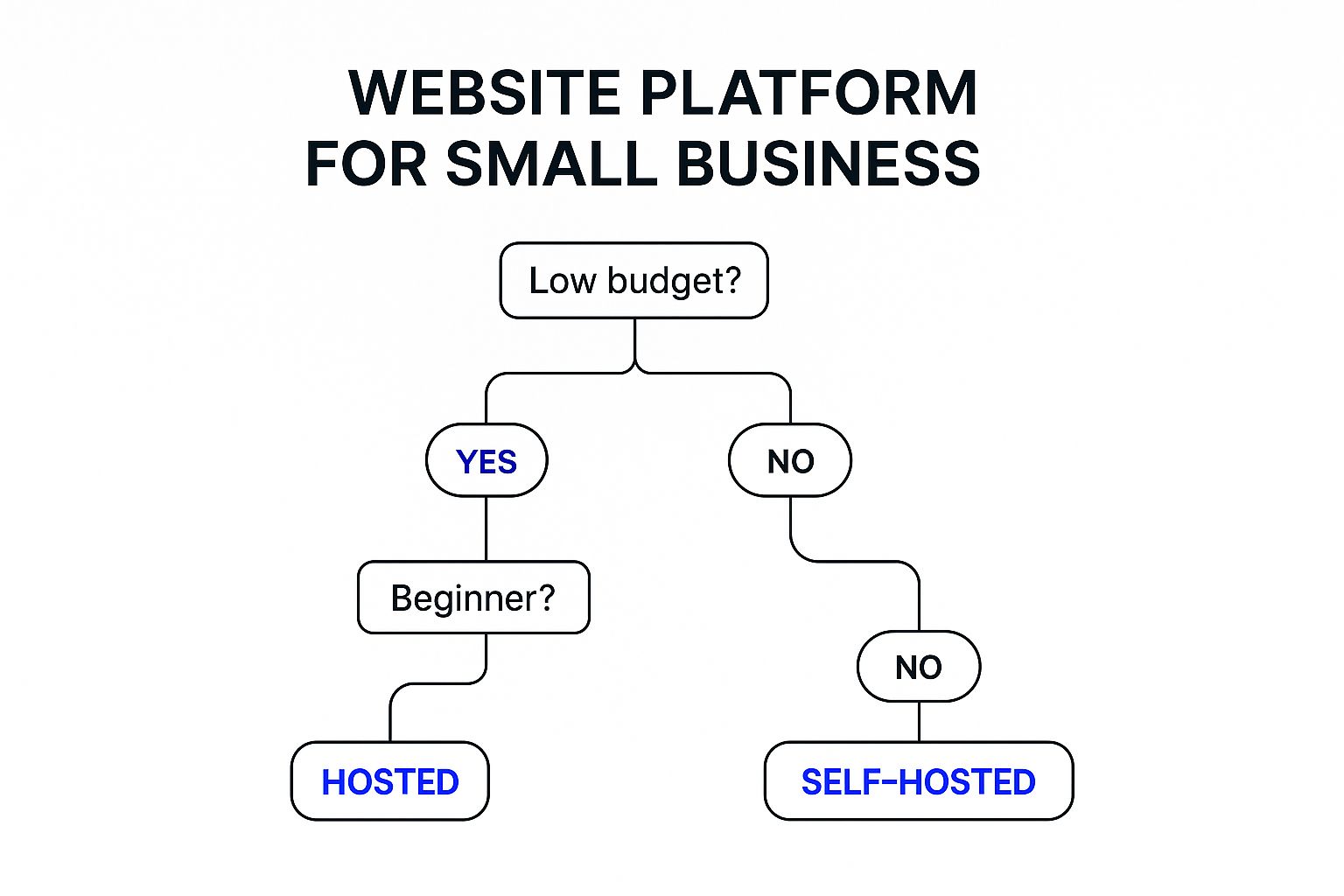
As the decision tree illustrates, aligning your budget, technical skills, and business goals is key to selecting the right website design approach. A limited budget and basic technical skills might point towards a DIY approach, while ambitious growth goals and a lack of technical expertise suggest professional design services are a better fit.
To further clarify the distinctions, let’s examine a comparison table:
DIY vs. Professional Website Design Comparison
This table compares key factors to consider when deciding between DIY website builders and professional web design services for small businesses.
| Factor | DIY Website Builders | Professional Design Services |
|---|---|---|
| Cost | Lower upfront cost | Higher upfront investment |
| Customization | Limited, template-based | Highly customizable, bespoke designs |
| Technical Skills Required | Minimal | Specialized expertise |
| Time Investment | Moderate, ongoing for updates and maintenance | Lower time investment for business owner |
| SEO | Basic tools, limited optimization | Advanced SEO strategies and implementation |
| Scalability | Can be challenging to scale as business grows | Designed for scalability and future growth |
| Maintenance | Responsibility of the business owner | Often handled by the design service |
In conclusion, while DIY website builders offer an accessible entry point, professional design services provide tailored solutions and long-term benefits that support sustainable business growth. Consider factors like your available time, technical skills, and long-term business goals to make the right decision for your needs.
Smart Budgeting for Small Business Website Success
Investing in a website is essential for small business growth. But smart budgeting is key. This means understanding the costs involved and getting the most value for your money. Let’s explore how to create a website budget that works.
Understanding Website Design Costs: A Tiered Approach
Website costs depend on the features and complexity you need. Think of website design in three tiers: basic, mid-range, and premium. Each tier offers a different balance of features and design.
Breaking Down the Costs: What to Expect
Basic websites are great for small businesses on a tight budget. They typically use templates and include essential features like contact forms and basic SEO (Search Engine Optimization). This is the most affordable way to establish an online presence.
Mid-range websites offer more customization and features. This tier often includes e-commerce integration, custom design elements, and more advanced SEO. It’s a good balance between affordability and enhanced functionality.
Premium websites offer the highest level of customization and features. They are often custom-built and include advanced integrations and ongoing support. This is best for businesses that need complex functionality and a unique online presence.
Ongoing Expenses: Planning for the Long Term
Don’t forget about the ongoing costs of a website! These include hosting, domain registration, security updates, content creation, and maintenance. Budgeting for these ensures your website stays secure, functional, and relevant.
Budgeting Strategies for Different Business Stages
A startup and an established business have different budget priorities. Startups might start with a basic website and add features as they grow. Established businesses might invest in a premium website redesign to attract new customers and improve their online presence.
Maximizing Your ROI: Strategic Resource Allocation
Smart budgeting means focusing on the features that will help you reach your business goals. If lead generation is your main goal, invest in a professional contact form and landing page optimization.
Small Business Website Cost Breakdown
To help you understand typical website costs, we’ve put together a breakdown of expenses across different budget tiers.
| Website Component | Basic Tier Cost | Mid-Range Cost | Premium Tier Cost | Recommended For |
|---|---|---|---|---|
| Domain Name | $10-$20/year | $10-$20/year | $10-$20/year | All Tiers |
| Hosting | $5-$25/month | $25-$100/month | $100+/month | All Tiers |
| Design & Development | $500-$2,000 | $2,000-$10,000 | $10,000+ | Varies based on needs |
| Content Creation | $0-$500 | $500-$2,000 | $2,000+ | All Tiers |
| SEO | $0-$250 | $250-$1,000 | $1,000+ | All Tiers |
| Maintenance | $0-$250/month | $250-$500/month | $500+/month | All Tiers |
This table provides a general overview. Actual costs may vary. For personalized guidance, consider contacting a professional web design service like Denver Web Studio. By planning your budget and choosing the right features, you can create a website that helps your business grow.
Connecting With Your Community Through Design
Successful local businesses use website design to build genuine connections within their community. This might involve showcasing neighborhood imagery, highlighting local landmarks, or incorporating community-specific content. By reflecting the local flavor, your website becomes more relatable and engaging for nearby customers. Think of it as creating a digital “welcome mat.”
For example, a Denver-based coffee shop could feature photos of its baristas interacting with regulars, or showcase local artists whose work is displayed in the cafe. This personal touch strengthens the connection with the Denver community.
Leveraging Local Keywords and Google Business Profile
Optimizing your website for local keywords is crucial for attracting customers searching for businesses like yours in your area. This means integrating relevant location-based terms throughout your website content and meta descriptions. Furthermore, a seamless integration with your Google Business Profile ensures your business appears prominently in local search results. This provides key information like your address, phone number, and hours, making it easier for local customers to find you.
Bridging the Gap Between Online and In-Store Experiences
Effective website design bridges the gap between online browsing and in-store visits, creating a seamless customer journey. This can involve features like interactive maps, store locators, and even real-time inventory displays. These tools offer practical information that encourages local customers to visit your physical location. You might be interested in: How to master your local SEO with sitemaps.
Integrating features like online appointment booking systems can also streamline the customer experience and drive foot traffic. For a restaurant, this might be online table reservations; for a salon, online appointment scheduling. These functionalities offer customer convenience and improve operational efficiency for your business.
Building Trust With Community Testimonials and Location-Specific Offers
Showcasing community testimonials and offering location-specific deals can greatly enhance your credibility and attract local customers. Testimonials from satisfied local customers build trust and social proof. Targeted offers incentivize nearby residents to choose your business over competitors. This could include discounts for first-time local customers or promotions tied to local events.
These strategies combine to create a website that not only attracts local customers but also converts them into loyal patrons. By understanding the unique needs and preferences of your local community, you can use website design to build lasting relationships and achieve sustainable growth.
Mobile-First Design: Where Small Businesses Win Big
With over 60% of web traffic coming from mobile devices, optimizing your website for smartphones is essential for small business success. It’s no longer a “nice-to-have” but a core requirement. This means focusing on a smooth mobile experience with easy navigation, quick loading times, and engaging content designed for smaller screens.
Responsive Frameworks: Adapting to Any Screen
A responsive framework forms the backbone of mobile-first design. Frameworks like Bootstrap and Foundation automatically adjust your website’s layout and content to fit different screen sizes. This adaptability ensures a consistent user experience across desktops, laptops, tablets, and smartphones.
This approach simplifies website management by eliminating the need for separate mobile sites. It also guarantees a positive experience for all users, no matter what device they’re using.
Touch-Friendly Navigation: Easy Browsing on the Go
Navigating on a touchscreen is different from using a mouse. Touch-friendly navigation uses larger buttons, intuitive gestures, and simplified menus. This makes it easy for users to browse with their fingers, improving their mobile experience and encouraging interaction.
Think about incorporating swipe functionality for image galleries or ensuring menu items are clearly spaced to prevent accidental clicks. These small changes can significantly improve usability.
Content Prioritization: Delivering Key Information First
Mobile users are often looking for specific information quickly. Prioritizing content for mobile means putting the most important information first. This might include concise product descriptions, prominent calls to action, or easy-to-find contact information.
This streamlined approach helps users find what they need without excessive scrolling or clicking. The result? Improved user satisfaction and a potential boost in conversions.
Streamlined Checkout: Optimizing Mobile Conversions
For e-commerce businesses, a mobile-optimized checkout process is crucial. Minimize form fields, offer guest checkout options, and integrate mobile payment gateways like Apple Pay or Google Pay.
A streamlined checkout experience removes obstacles, leading to higher conversion rates and more sales. This is particularly important with the growth of mobile commerce.
Testing and Analysis: Refining Your Mobile Experience
Building a great mobile experience is an ongoing process. Regularly test your website on various mobile devices and analyze user behavior. This data can reveal areas for improvement and help you optimize your site for better performance.
Tools like Google Analytics provide valuable data on mobile user behavior, allowing you to make informed decisions. By continuously refining your design based on this feedback, you can ensure your website effectively captures mobile traffic and drives business growth.
Measuring Success: Website Analytics That Drive Growth
A beautiful website design for small businesses is only half the battle. The other half lies in understanding how that design performs and drives growth. To move beyond superficial metrics like page views, we need to focus on data that truly matters: data that informs decisions and fuels business growth.
Key Performance Indicators (KPIs) for Small Business Websites
The first step in measuring success is identifying the right Key Performance Indicators (KPIs). These metrics should align directly with your business objectives. For an e-commerce business, a key KPI might be conversion rate – the percentage of visitors who make a purchase. For a service-based business, it could be the number of contact form submissions or phone calls generated through the website.
A brick-and-mortar business might prioritize driving foot traffic, tracking store visits originating from online directions or special offers on the website. Choosing KPIs relevant to your specific business model ensures you’re measuring what truly matters.
Implementing Tracking Systems: Simple Yet Effective Tools
Tracking your KPIs doesn’t require complex, expensive software. Google Analytics provides a wealth of data for free. Setting up conversion tracking allows you to monitor specific actions users take on your site, like completing a purchase or submitting a form.
Additionally, event tracking helps understand user interactions with specific elements, like clicking a particular button or watching a video. This data provides valuable insights into visitor behavior.
Interpreting Visitor Behavior: Understanding User Journeys
Understanding how visitors navigate your website is essential for identifying areas for improvement. Analyzing bounce rate (the percentage of visitors who leave after viewing only one page) can highlight potential problems with your design or content.
Examining time on page and pages per session provides further insight into user engagement. For example, a high bounce rate on a product page might suggest a need for better product descriptions or higher-quality images.
Actionable Improvements: Turning Data Into Design Enhancements
Data-driven insights should lead to actionable design improvements. If users are abandoning their shopping carts at a high rate, perhaps simplifying the checkout process or offering more payment options could boost conversions.
If your contact form isn’t generating enough leads, perhaps making it more prominent or reducing the number of required fields could improve results. Using data to refine your website design ensures a continuous cycle of improvement.
A/B Testing: Simple Experiments With Big Impact
A/B testing is a powerful technique for comparing two versions of a webpage to see which performs better. You might test different headlines, calls to action, or image placements. This experimentation doesn’t require enterprise-level resources.
Simple A/B testing tools are readily available and can provide valuable insights into what resonates with your audience. This iterative process helps you optimize your website for maximum effectiveness.
Realistic Benchmarks: Measuring Progress Over Time
Establishing realistic benchmarks based on your industry and business stage provides context for your data. Comparing your performance to industry averages helps identify areas where you excel and where you need improvement. Tracking your progress over time allows you to measure the impact of your design changes and demonstrate the value of your website as a business asset.
Ready to transform your online presence and achieve real business growth? Contact Denver Web Studio today for a free consultation. We’ll help you create a website that not only looks great but also delivers measurable results. Let’s build something exceptional.
You might also be interested in learning about our web development process to see how strategy and execution come together.